Friday, 2 October 2015

Access the .NET Server Controls using javascript easily


  • There are many developers that are depend on intellisense provided by Microsoft Visual Studio.
  • But some times it may not work for scripting, though in VS 2012 and higher version it quite run much good.
  • So here are some of the JS code that I would like to share with developers for accessing the .NET controls and how to retrieve and set value to controls.
  • Get Label Value:
  • $('#<%=Label.ClientID%>').text();
  •  Set label value:
  • $('#<%=Label.ClientID%>').text("New Value");
  •  
  • Get Textbox value:
  • $('#<%=TextBox.ClientID%>').val();
  •   Set Textbox value:
  • $('#<%=TextBox.ClientID%>').val("New Value");
  •  Get Dropdown value:
  • $('#<%=DropDownList.ClientID%>').val();
  •  Set Dropdown value:
  • $('#<%=DropDownList.ClientID%>').val("New Value");
  •  Get text of selected item in dropdown:
  • $('#<%=DropDownList.ClientID%> option:selected').text();
  •  Get Checkbox Status:
  • $('#<%=CheckBox.ClientID%>').attr('checked');
  •  Check the Checkbox:
  • $('#<%=CheckBox.ClientID%>').attr('checked',true);
  •  Uncheck the Checkbox:
  • $('#<%=CheckBox.ClientID%>').attr('checked',false);
  • Get Radiobutton Status:
  • $('#<%=RadioButton.ClientID%>').attr('checked');
  •  Check the RadioButton:
  • $('#<%=RadioButton.ClientID%>').attr('checked',true);
  •  Uncheck the RadioButton:
  • $('#<%=RadioButton.ClientID%>').attr('checked',false);
  •  Disable any control:
  • $('#<%=TextBox.ClientID%>').attr('disabled', true);
  •  Enable any control:
  • $('#<%=TextBox.ClientID%>').attr('disabled', false);
  •  Make textbox read only:
  • $('#<%=TextBox.ClientID%>').attr('readonly', 'readonly');

  • For getting the data you may also use as what I have said in previous blog, that is simpler

Tuesday, 22 September 2015

ORA:06413 Connection not Open


  • This blog is for those who want to connect Visual Studio with Oracle Database 10g or lower upto 9i.
  • I seen there are lots of problem while connecting the Visual Studio with the Oracle 10g and 9i.
  • I would like to share that Oracle has already left the support for the same & so as the patch for connection.
  • Then instead of using Oracle 10g or 9i client for connection with Oracle Server use the client for which Oracle Corporation use to give support. 
  • I had the same problem , all code and path variable were  checked and  were perfect. But then also Client was not connecting to oracle 10g Server.
  • Even though from SQL PLUS  it was connected. 
  • Thereafter I just uninstalled Oracle 10g client and installed Oracle 11g R2 32-bit and placed tns file in ADMIN folder of OracleHome. 
  • I checked once again from VS 2010 and VS 2012 and executed code. The server was connected. 

For any query you may comment . Yours comments would be appreciated.

Thursday, 10 September 2015

Get the data from server controls using javascript in asp.net


  • Today I'll show you how to retrieve the server controls data easily using Javascript in ASP.NET.
  • Normally people I have seen use to retrieve the data from controls is using  something like this:
function validate()
{
     var text=document.getElementById('<%=TextBox1.ClientId%>').value;
   // do stuffs
}

  • And then more code for if you want dropdownlist data and some other controls.
  • Instead simply one can use String function as (e.g. for DropDownList):

function validate()
{
     var text=String('<%=DropDownList1.SelectedItem.Text%>');
     var  value=String('<%=DropDownList1.SelectedItem.Value%>');
   // do stuffs
}

  • That was for this blog have a great day. And yes any one having difficulty can comment anytime.

Wednesday, 26 August 2015

Insert the data/password by using Cryptography (Encryption/Decryption)


  • Always store password using reversible encryption so as the encrypted password can also be decrypted when need to be used.
  • But at the same time it is also important to use the strong encryption algorithm.
  • Here I'll demonstrate you one of the method for encrypting the data and storing them into database. And Vice-versa.

  • Two Class file one is DBAccess where all database stuffs are done and another EncDecClass file for encrypting and decrypting the data.


  • This code shows the button click event for storing the encrypted password into database. It calls "Encrypt" method of Class file for encrypting the password.

  • Before encryption you should generate a key which is as shown below.


  • Now let us see how Encrypt method works:
  • And in the same way for decryption. We'll call decrypt method from codebehind file for decryption of password .
  • This code shows the button click event for retrieving the encrypted password into database. It calls "Decrypt" method of Class file for decrypting  the password.

  • Now let use see how the decryption works.


  • And yes this is it.  Here your password get decrypted.
  • For more information leave comments please.
  • And let me know the difficulties you are facing I'll definitely try to sort it out if I had gone through it.
  • Good Luck!

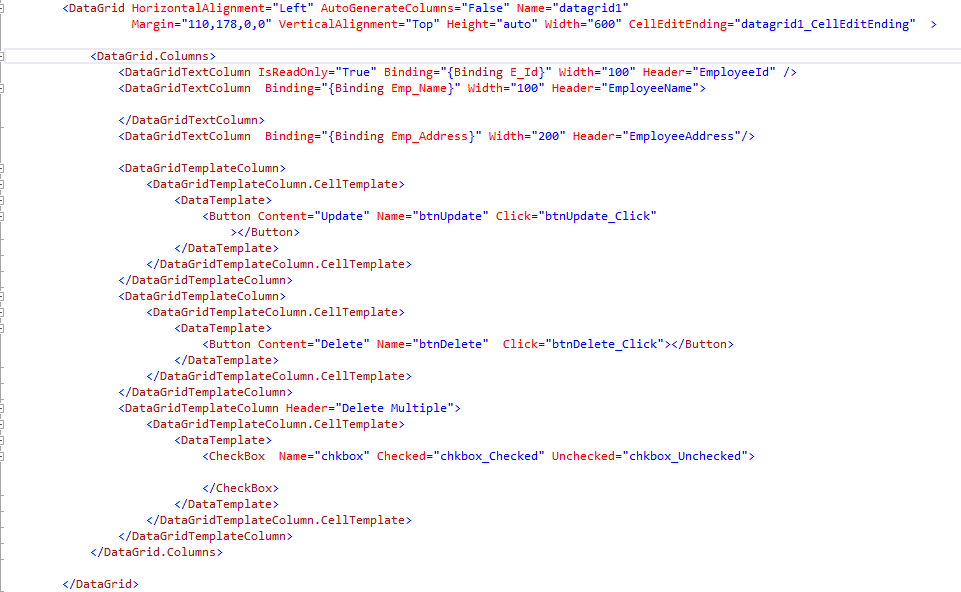
Update the records from DataGrid in WPF

  • In the previous post I've posted that how to delete the record from datagrid using Stored Procedure in WPF.
  •  In this  post we would see how to update the records from datagrid in WPF.
  1. XAML Code:


2. Code Behind :


  • This is it.  It's done your record will be updated. Enjoy. For any query please comment me.
  •  Here framework element is used to get the data from current cell of row.


Tuesday, 18 August 2015

Delete in WPF Data Grid (Simple Stuff no more code) C#


  • Yes it's really not much confusing as we understand to delete or update the data in datagrid in wpf. Actually while googling i too got much confused why are all using Linq to Sql class or EF for such an easy thing.
  • I thought this code to post because some of the person asked me that is there not any simple way to delete the record from data grid rather than using Linq to Sql Class and EF.
  • Yes you can also do it with stored procedure or either simply firing normal query it's upto you.
  • I will show you one simple way to achieve with stored procedure.
  1. XAML Code:


2. Code Behind :


  • This is it.  It's done your record will be deleted. Enjoy. For any query please comment me.
P.S. This code is just for deleting the record.


Thursday, 31 July 2014

Select the data from database using Linq to SQL

Simple query in Linq to SQL for selecting the data: try { DataBaseDataContext ZCLS = new DataBaseDataContext(new OdbcConnection(strConnection)); //execute query var result = from s in ZCLS.GroupAddresses select s; /* select new (s.ChannelNo,s.ChannelPhone,s.IPNo,s.ComputerName,s.UserName);*/ for selecting some of the fields. } catch (Exception ex) { // code yours }

How To Pass An Array As A Parameter While Calling an ASP.NET Web API C#

Please visit my C# Corner Blog for this, where I have provided better efforts to make this concept more understandable - www.c-sharpcorner....