Wednesday, 26 August 2015

Update the records from DataGrid in WPF

  • In the previous post I've posted that how to delete the record from datagrid using Stored Procedure in WPF.
  •  In this  post we would see how to update the records from datagrid in WPF.
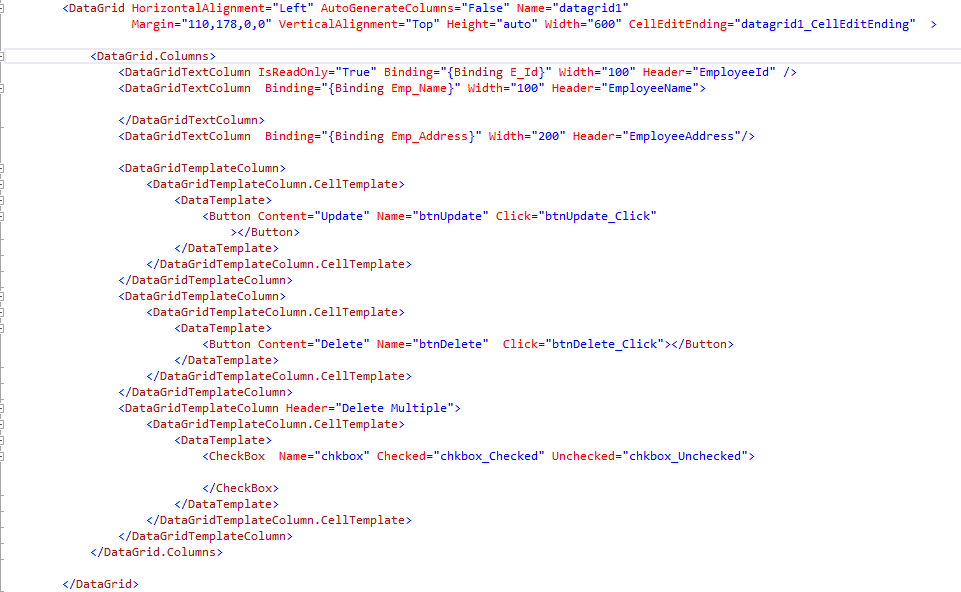
  1. XAML Code:


2. Code Behind :


  • This is it.  It's done your record will be updated. Enjoy. For any query please comment me.
  •  Here framework element is used to get the data from current cell of row.


Tuesday, 18 August 2015

Delete in WPF Data Grid (Simple Stuff no more code) C#


  • Yes it's really not much confusing as we understand to delete or update the data in datagrid in wpf. Actually while googling i too got much confused why are all using Linq to Sql class or EF for such an easy thing.
  • I thought this code to post because some of the person asked me that is there not any simple way to delete the record from data grid rather than using Linq to Sql Class and EF.
  • Yes you can also do it with stored procedure or either simply firing normal query it's upto you.
  • I will show you one simple way to achieve with stored procedure.
  1. XAML Code:


2. Code Behind :


  • This is it.  It's done your record will be deleted. Enjoy. For any query please comment me.
P.S. This code is just for deleting the record.


Thursday, 31 July 2014

Select the data from database using Linq to SQL

Simple query in Linq to SQL for selecting the data: try { DataBaseDataContext ZCLS = new DataBaseDataContext(new OdbcConnection(strConnection)); //execute query var result = from s in ZCLS.GroupAddresses select s; /* select new (s.ChannelNo,s.ChannelPhone,s.IPNo,s.ComputerName,s.UserName);*/ for selecting some of the fields. } catch (Exception ex) { // code yours }

Friday, 14 February 2014

Insert Data into database


Inserting data into a database is a simple process in ASP.NET.As compared to PhP and JAVA in ASP.NET there is no need to write all connection stuffs, instead only just map the connection string to application and here's the connection created,
Now today i am going to show you a demo of how to Insert Data in database using ASP.NET & SQL Server.

Consider you have a Table named Employee in database: And the form you designed is some what like this :
Employee Name:
Employee Contact:

Html Source :
using System;
using System.Collections.Generic;
using System.Linq;
using System.Web;
using System.Web.UI;
using System.Web.UI.WebControls;
using System.Data;
using System.Data.SqlClient;
using System.Configuration;

public partial class _Default : System.Web.UI.Page
{
    SqlConnection con = new SqlConnection(ConfigurationManager.ConnectionStrings["Conn"].ConnectionString);

     protected void Page_Load(object sender, EventArgs e)
    {
       
    }
 protected void insrtbtn_Click(object sender, EventArgs e)
    {
        con.Open();
        SqlCommand cmd = new SqlCommand("Select EmployeeName from Employee where EmployeeName='"+txtName.Text+"'",con);
        SqlDataReader dr = cmd.ExecuteReader();
        if (dr.Read())
        {
            Response.Write("Data already exist");

        }

        else
        {
            con.Close();
            con.Open();
            SqlCommand insrt = new SqlCommand("insert into Employee(EmployeeName,EmployeeContact) values('"+txtName.Text+"','"+txtcontact.Text+"')",con);
            insrt.ExecuteNonQuery();
            con.Close();
            Response.Write("Data inserted");
           
        
        }
    }
      
Hope you like this inserting data for any query regarding ASP.NET just contact me.
Thursday, 30 January 2014

Instead of using Cascading Dropdown list in AJAX use LINQ


I've seen many of them are using Ajax "Cascading DropdownList" for selecting countries and states and other all .....
But the far better way is to use LINQ(Language Integrated Query) ....
Today i am going to share with you the linq query for selecting state on selection of Country dropdown....:)

Front end Image:


Developing :
using System;
using System.Collections.Generic;
using System.Linq;
using System.Web;
using System.Web.UI;
using System.Web.UI.WebControls;
using System.Data;
using System.Data.SqlClient;

public partial class _Default : System.Web.UI.Page
{
    DataClassesDataContext data = new DataClassesDataContext();
    protected void Page_Load(object sender, EventArgs e)
    {
        if (!Page.IsPostBack)
        {
            var fetch = from m in data.CountryTabs select new { m.C_ID, m.CountryName };
            DropDownList1.DataTextField = "CountryName";
            DropDownList1.DataValueField = "C_ID";
            DropDownList1.DataSource = fetch;
            DropDownList1.DataBind();
        }
    }
    protected void DropDownList1_SelectedIndexChanged(object sender, EventArgs e)
    {
      
        
        var fetch = from m in data.StateTabs where m.Cntry_ID==Convert.ToInt32(DropDownList1.SelectedItem.Value) select new {m.StateName};
        DropDownList2.DataTextField = "StateName";
        DropDownList2.DataValueField = "StateName";
        DropDownList2.DataSource = fetch;
        DropDownList2.DataBind();


    }
}

Instead of using Cascading Dropdown list in AJAX use LINQ


I've seen many of them are using Ajax "Cascading DropdownList" for selecting countries and states and other all .....
But the far better way is to use LINQ(Language Integrated Query) ....
Today i am going to share with you the linq query for selecting state on selection of Country dropdown....:)

Front end Image:


Developing :
using System;
using System.Collections.Generic;
using System.Linq;
using System.Web;
using System.Web.UI;
using System.Web.UI.WebControls;
using System.Data;
using System.Data.SqlClient;

public partial class _Default : System.Web.UI.Page
{
    DataClassesDataContext data = new DataClassesDataContext();
    protected void Page_Load(object sender, EventArgs e)
    {
        if (!Page.IsPostBack)
        {
            var fetch = from m in data.CountryTabs select new { m.C_ID, m.CountryName };
            DropDownList1.DataTextField = "CountryName";
            DropDownList1.DataValueField = "C_ID";
            DropDownList1.DataSource = fetch;
            DropDownList1.DataBind();
        }
    }
    protected void DropDownList1_SelectedIndexChanged(object sender, EventArgs e)
    {
      
        
        var fetch = from m in data.StateTabs where m.Cntry_ID==Convert.ToInt32(DropDownList1.SelectedItem.Value) select new {m.StateName};
        DropDownList2.DataTextField = "StateName";
        DropDownList2.DataValueField = "StateName";
        DropDownList2.DataSource = fetch;
        DropDownList2.DataBind();


    }
}

Thursday, 2 January 2014

Understanding C#


Before going towards ASP.NET the use of C# or VB.NET is important.Because as i said that ASP.NET is compiled using VB.NET/C# compiler. That means these are the code behind file, in which the logic would be sustained and the ".aspx" (Active Server Page Extension)is the Source file which contains Desigining part.

How To Pass An Array As A Parameter While Calling an ASP.NET Web API C#

Please visit my C# Corner Blog for this, where I have provided better efforts to make this concept more understandable - www.c-sharpcorner....